We Could apply filter or filters in graphQL query to get the filtered result. Below is an example of filter query. You could also run or play this query here<https://lucasconstantino.github.io/graphiql-online> and understand how this query is working with actual results.
1. Using filter keyword
query getCountries {countries(filter: { code: { eq: "IN" } }) {namephonecodelanguages @include(if: true) {namenativertl}}}
Result: The result of above graphQL query you will see as below.
{
"data": {
"countries": [
{
"name": "India",
"phone": "91",
"code": "IN",
"languages": [
{
"name": "Hindi",
"native": "हिन्दी",
"rtl": false
},
{
"name": "English",
"native": "English",
"rtl": false
}
]
}
]
}
}
2. Using unique property of the object
Other way to filter is use the unique property of country and add that as a parameter. Here is an example.
query getCountries2 {
country(code: "IN") {
name
phone
code
languages @include(if: true) {
name
native
rtl
}
}
}
This query will also return the same as above query.
Screenshot for reference:
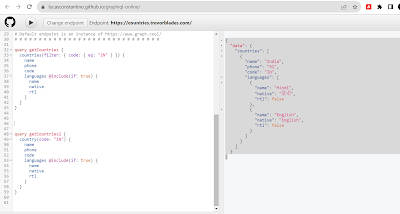 |
| How to write GraphQL query with filter |
Thank you for all the valuable information you’ve shared. I truly appreciate your hard work and dedication. Please keep the updates coming — we look forward to more insights from you.
ReplyDeleteDedicatedHosting4u.com can help you grow your online business to new heights.With dedicated servers, virtual private servers, and colocation.
Offshore dedicated server
Resell dedicated servers
Cheapest dedicated hosting
managed vs unmanaged server
Reliable dedicated hosting
secure dedicated server